
AI video conferencing is no longer limited to background blur, noise suppression and automatic captions.
Current platforms can transcribe conversations, summarize discussions, identify decisions, extract action items, answer questions about an ongoing meeting and turn a live conversation into information that remains useful after the call ends.
But these capabilities should not be compared under a single AI features label.
Noise suppression and an AI-generated meeting summary both use AI, but they solve completely different problems.
A more useful comparison asks three questions:
What does AI do during the meeting?
What does it produce after the meeting?
Where is the meeting data processed?
This guide compares six AI video conferencing platforms around those questions.
AI Video Conferencing Platforms Compared
Feature availability varies by subscription, edition and deployment.
The most important difference is not how many AI features a platform advertises.
It is what meeting input the AI receives, what output it creates and where that processing takes place.
Two Types of AI in Video Conferencing
The term AI video conferencing currently describes two different categories of technology.
Media AI improves the call itself.
Meeting intelligence interprets what participants say and turns the discussion into structured information.
A platform can be strong in one category without being equally strong in the other.
For organizations evaluating AI conferencing primarily to reduce meeting administration, meeting intelligence is usually the more important category.
Where AI Adds Value During and After a Meeting
During the Meeting
In-meeting AI helps while the conversation is still happening.
Depending on the platform, users may be able to:
-
follow a live transcript;
-
receive translated captions;
-
ask what they missed;
-
identify decisions already made;
-
retrieve action items;
-
generate real-time notes;
-
improve audio quality;
-
reduce background noise.
The most important development is the shift from passive transcription to conversational meeting assistance.
Instead of simply reading captions, a participant can ask a system what has happened so far or whether a specific topic has already been discussed.
That makes AI useful even before the meeting ends.
After the Meeting
Post-meeting AI turns conversation into a reusable business artifact.
Common outputs include:
-
transcripts;
-
summaries;
-
decisions;
-
action items;
-
meeting notes;
-
searchable records;
-
follow-up material.
This can remove one of the main weaknesses of traditional video meetings: important information often remains buried in a recording or disappears when participants leave the call.
However, the AI-generated output can also become persistent organizational data.
That makes storage, access and retention part of the product comparison.
1. Zoom AI Companion
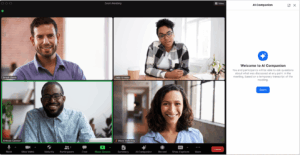
Best for: General business meetings where users need live catch-up and AI assistance inside an established cloud conferencing environment.
Zoom AI Companion can answer questions about an active meeting using meeting content available to the feature.
Participants can use it to catch up after joining late, identify action items or ask whether a particular topic or decision has already been discussed.
Zoom documents preset and custom questions such as:
-
What did I miss?
-
Was my name mentioned?
-
What are the action items?
-
Was a decision made?
This makes Zoom useful when AI needs to assist users during the meeting rather than only generate a recap afterward.
Zoom also provides post-meeting AI outputs as part of the broader Zoom Workplace environment.
What stands out
Zoom’s clearest AI advantage is in-meeting querying.
A late participant can retrieve context without interrupting the meeting and asking others to repeat the discussion.
AI boundary
AI Companion availability depends on the Zoom Workplace plan and administrative configuration.
Organizations should also review Zoom’s current AI data documentation because different AI functions may use different model and processing arrangements.
Sources: Zoom AI Companion meeting questions · Zoom AI Companion administration
2. TrueConf with TrueConf AI Server
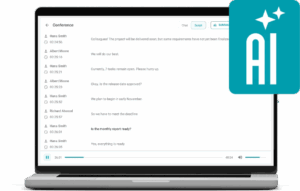
Best for: Organizations that want meeting transcription and summarization on customer-operated AI infrastructure.
TrueConf uses a different AI architecture from the cloud services in this comparison.
TrueConf AI Server is a separate component that integrates with TrueConf Server and can run within infrastructure controlled by the organization.
Current documentation describes capabilities including:
-
meeting transcription;
-
transcript storage;
-
summarization;
-
customizable summarization prompts;
-
transcript and summary export;
-
access controls.
TrueConf Server can send conference audio intended for transcription to the integrated AI Server, where the transcription and summarization workflow is processed.
This makes the AI processing layer an explicit part of the deployment architecture rather than an invisible cloud service attached to the meeting.
What stands out
The main distinction is where AI inference occurs.
For organizations already operating their own conferencing environment, TrueConf provides an option in which transcription and summarization can also be handled by a customer-operated component.
The buying question therefore changes from:
Does the meeting platform provide AI summaries?
to:
Where is the meeting audio processed, and where do the resulting transcripts and summaries remain?
This matters when the AI processing model is part of infrastructure, governance or procurement requirements.
AI boundary
TrueConf AI Server is a separate infrastructure component.
It requires deployment, integration, licensing and appropriate hardware resources.
It should therefore be evaluated as an AI infrastructure layer rather than as a feature automatically included with every TrueConf Server installation.
Sources: TrueConf AI Server Usage Guide · TrueConf Server AI integration
3. Microsoft Teams with Copilot and Facilitator

Best for: Organizations where meetings are already part of Microsoft 365 workflows.
Microsoft Teams combines several AI functions rather than relying on a single meeting assistant.
Copilot can reason over meeting discussion and chat, answer questions, identify action items and summarize what participants have said.
For example, users can ask Copilot to:
-
summarize a discussion;
-
identify disagreement;
-
extract decisions;
-
organize ideas;
-
explain what happened before they joined.
Microsoft also provides Facilitator, an AI agent designed specifically around meeting workflow.
Facilitator can generate real-time notes, identify decisions and open questions, work with the meeting agenda and help structure the discussion.
What stands out
Teams is particularly strong when meeting AI benefits from context outside the call.
The meeting exists inside Microsoft 365 rather than as an isolated video session, so AI can support a broader work environment involving chat, documents, calendar and project context.
AI boundary
Copilot and Facilitator depend on licensing, transcription configuration and organizational policies.
Some Copilot functions can operate during the meeting without a persistent transcript, while post-meeting analysis generally depends on retained meeting data.
Sources: Copilot in Teams meetings · Facilitator in Teams
4. Google Meet with Gemini
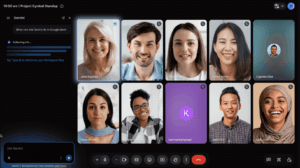
Best for: Organizations that want meeting AI integrated with Google Workspace.
Google Meet separates AI assistance during the meeting from the shared notes created afterward.
Ask Gemini in Meet can help participants catch up, summarize the discussion, identify decisions and answer questions based on meeting content.
This is particularly useful for someone who joins late and needs immediate private context.
Google’s Take notes for me feature serves a different purpose.
Instead of answering an individual participant’s question, it creates structured meeting notes that can be stored in Google Docs and connected to the Calendar event.
That difference matters.
Ask Gemini helps a person understand the current meeting.
Take notes for me creates a shared artifact for the group.
Google also provides AI-powered media features such as Studio sound, Studio look and Studio lighting on supported Workspace plans.
What stands out
Google Meet provides a clear distinction between private AI assistance during the meeting and shared post-meeting documentation.
AI boundary
Availability depends on Google Workspace and Gemini licensing.
Language support and feature behavior also vary between Ask Gemini, note-taking, captions and other AI functions.
Sources: Ask Gemini in Google Meet · Take notes for me
5. Cisco Webex AI Assistant
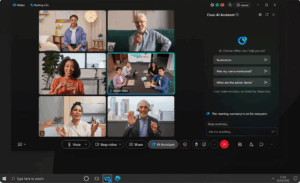
Best for: Enterprises that want meeting summaries, catch-up and AI controls inside an established enterprise conferencing platform.
Cisco AI Assistant can summarize meetings, answer questions about what has happened and generate meeting transcripts and summaries.
Webex documents several in-meeting actions, including:
-
catching up on the recent discussion;
-
checking whether your name was mentioned;
-
finding action items;
-
asking questions about meeting content.
Webex can also create a summary and transcript without requiring a conventional video recording.
This is an important distinction because recording the meeting and creating an AI-generated meeting artifact are not necessarily the same operation.
What stands out
Webex makes AI activation and participant awareness relatively explicit.
Current documentation describes notifications and controls when meeting summaries, transcription or related AI features are enabled.
That makes the AI layer part of meeting governance rather than simply an invisible background feature.
AI boundary
AI Assistant functions depend on Webex licensing and administrator settings.
Language support can also differ between standard AI features and additional translation capabilities.
Source: Cisco AI Assistant in Webex meetings
6. RingCentral AI Meetings

Best for: Organizations that want meeting AI inside a broader voice, messaging and video environment.
RingCentral provides AI features around meeting transcription, summaries, notes and action items.
Its AI meeting capabilities can turn a call into structured output instead of leaving users with only a recording or manual notes.
The main reason to consider RingCentral is not a single unique AI feature.
It is the relationship between meeting intelligence and a broader unified communications environment.
For organizations already using RingCentral for messaging and telephony, AI-generated meeting information can remain part of the same communications workflow.
What stands out
RingCentral is most relevant when the requirement is:
AI meeting assistance inside unified communications, rather than a standalone AI meeting product.
AI boundary
Feature availability depends on the RingCentral product and subscription.
Buyers should verify the exact package rather than assuming that every AI Meetings function is included in every RingCentral Video or RingEX configuration.
Sources: RingCentral AI Meetings · RingCentral Video
Where Does Meeting AI Process Your Data?
The AI feature itself is only one part of the meeting intelligence workflow.
A simplified data path looks like this:
meeting speech or media → transcription or extracted data → AI processing → summary or action items → stored artifact
The important purchasing question is who operates each stage.
Vendor-Hosted AI
Zoom, Microsoft Teams, Google Meet, Webex and RingCentral primarily provide AI through vendor-operated cloud environments.
This has a clear advantage: the conferencing platform and AI functionality are integrated into the same service.
Organizations do not need to deploy a separate inference environment.
The trade-off is that buyers need to understand:
-
which meeting data is processed;
-
which AI services or models are involved;
-
where transcripts and summaries are retained;
-
who can access them;
-
which administrative controls are available.
Customer-Operated AI
TrueConf AI Server represents a different model.
The organization deploys the AI component and integrates it with its own TrueConf Server infrastructure.
This can be relevant where control of the video conferencing environment and control of AI processing are both requirements.
The distinction is important:
self-hosted video conferencing does not automatically mean self-hosted AI.
The AI deployment architecture needs to be verified separately.
Which AI Capability Solves Your Meeting Problem?
The best AI conferencing platform is therefore not necessarily the product with the largest AI feature list.
It is the one that addresses the actual failure point in the organization’s meeting workflow.
What to Verify Before Enabling Meeting AI
This verification should be performed for the specific AI feature.
A platform may process background effects differently from transcription, and transcription differently from generative summarization.
A single statement such as AI enabled does not describe the complete data path.
Frequently Asked Questions
What is AI video conferencing?
AI video conferencing uses machine learning or generative AI to improve a video meeting or process its content.
Common applications include noise suppression, transcription, translated captions, meeting summaries, action-item extraction and conversational meeting assistants.
Which video conferencing platforms have AI?
Zoom, Microsoft Teams, Google Meet, Cisco Webex and RingCentral all provide integrated AI meeting capabilities.
TrueConf can provide meeting transcription and summarization through TrueConf AI Server using a customer-operated deployment model.
Can AI summarize video meetings?
Yes.
AI meeting tools can convert meeting speech or transcripts into summaries, decisions, notes and action items.
The exact output, licensing and retention model differ between platforms.
Does AI video conferencing require recording the meeting?
Not necessarily.
Recording, transcription and AI summarization can be separate processes.
For example, Webex documents the ability to produce meeting summaries and transcripts without creating a conventional video recording.
Organizations should verify which source data each AI function requires.
Can AI video conferencing run on-premises?
Some AI meeting processing can run on customer-operated infrastructure.
TrueConf AI Server is designed as a separate component integrated with customer-operated TrueConf Server deployments for transcription and summarization.
A self-hosted conferencing platform should not automatically be assumed to provide self-hosted AI. The AI processing layer must be checked separately.
Conclusion
AI video conferencing should not be compared by counting how many AI features appear on a product page.
The more useful comparison asks:
What does AI do during the meeting?
What information does it create afterward?
Where is that data processed and stored?
Zoom, Microsoft Teams, Google Meet, Webex and RingCentral primarily integrate AI into vendor-operated cloud collaboration environments.
TrueConf adds a materially different architecture through a customer-operated AI Server integrated with the conferencing platform.
The best option therefore depends not only on what the AI can generate.
It also depends on which meeting problem needs to be solved and which AI data path the organization is prepared to use.
Author
Helga Afon is a technology writer specializing in video conferencing, collaboration software, and workplace communication. She writes articles and reviews that help readers better understand enterprise communication tools and industry trends.